Zero-Cloud Family Photography: How FamJam Keeps Kids & Home Photos Off External Servers
Photos of your children and your living room do not belong in a startup's S3 bucket. Here is how FamJam pairs Apple TV with your iPhone or iPad strictly inside your own four walls.
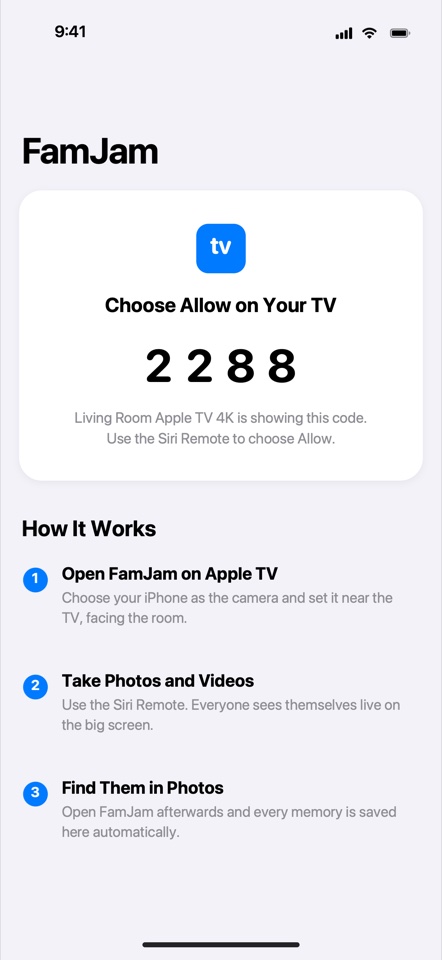
Most modern camera and photo-sharing apps start by asking for your email address, phone number, and permission to upload every shot to their cloud servers so you can fetch it on another device.
FamJam takes the opposite engineering path: there is no FamJam server to hack, subpoena, or shut down. Every byte travels directly from your Apple TV to your iPhone or iPad over your local router — verified by cryptographic proof that only someone standing in your living room could possess.
How Local-Only Pairing & Saving Works Under the Hood
Local Bonjour discovery (_famjam._tcp)
Your iPhone or iPad discovers your Apple TV purely on your local LAN via Apple's Bonjour mDNS — zero external signaling servers or cloud relay accounts.
URL-fragment pairing secret on the TV screen
When you scan the Send to iPhone QR code, the one-time pairing secret sits inside the URL fragment (#...), which browsers never transmit in plain HTTP headers — proving your device physically saw the TV screen.
4-digit Siri Remote confirmation + Keychain HMAC
Both screens display matching 4-digit verification codes, and someone holding the Siri Remote must click Allow. From then on, requests are signed with an installation-specific HMAC key stored in the iOS/tvOS Keychain.
Add-only Photos permission on iPhone & iPad
FamJam requests NSPhotoLibraryAddUsageDescription (Add Photos Only) — meaning the app can deposit new memories into your Photos library, and the operating system mathematically prevents it from reading any existing photos.
FamJam Privacy Architecture at a Glance
| Privacy Dimension | Typical Photo Booth / Sharing Apps | FamJam |
|---|---|---|
| Account / email required | Yes | None |
| Cloud photo storage | Uploaded to vendor cloud | 100% local device + LAN |
| App Store Privacy Label | Identifiers, Usage Data, Photos | Data Not Collected |
| iOS Photos Library access | Full Read & Write | Add-Only (cannot read library) |
| Works if internet ISP goes down | Often fails | Works on local Wi-Fi LAN |
Good Hygiene on Shared Home Networks
In FamJam Settings on Apple TV, you can view or remove paired phones in one click — immediately invalidating their HMAC key.
Guest Safari downloads only stay active while you intentionally keep the Send to iPhone QR code open for your guests.
Try FamJam on your Apple TV tonight
No account, no cloud uploads, and zero tracking. Set your iPhone or Center Stage iPad near the TV and capture everyone together.
Frequently Asked Questions
What happens if I delete FamJam on Apple TV?
Any memories already saved to your iPhone or iPad live permanently inside your standard Apple Photos library (and your own iCloud Photos if you use it) — completely independent of FamJam.
Does FamJam include any third-party analytics or crash SDKs?
Zero. Both the tvOS and iOS/iPadOS binaries are built exclusively against Apple's first-party system frameworks (AVFoundation, Network, CryptoKit, Photos, StoreKit, SwiftUI).